sixty dollars
A tablet the manufacturer stopped updating, a bootloader the internet said was welded shut, and a toggle sitting in Developer options that nobody checked.
Sixty dollars twenty-seven dollars (on sale) buys an 8-inch Walmart tablet that onn shipped, patched to Android 15, and then walked away from. Its last security patch is dated 2025-11-05. Every source I could find said the bootloader on this generation could not be unlocked, so the plan was built around exploiting the MediaTek BootROM to get around it.
The plan was unnecessary. The toggle was in Developer options and it wasn’t greyed out.
What you buy when you buy a supported device is a company’s continued willingness to compile software for hardware it has already sold you. onn’s willingness ran out on 2025-11-05. For most of the last twenty years that date was the end of the device — not because the silicon stopped working, but because nobody was going to write the software that kept it useful. That’s the part that changed, and it’s the only thing here worth arguing about, so it’s at the bottom.
Before and after
Same hardware. Same 2.9 GB of RAM. Everything below changed in one evening, and only one step was irreversible.
| Stock — onn TTA.23 | LineageOS 23.2 GSI | |
|---|---|---|
| Android | 15 · SDK 35 | 16 · SDK 36 |
| Patch level | 2025-11-05 | 2026-05-01 |
| Google pkgs | ~100 | 22 |
| Walmart pkgs | 2 | 0 |
| Storage used | 6.2 GB | 1.1 GB |
| Bootloader | locked | unlocked |
| Future updates | none | ongoing |
Security patches six months newer than anything the manufacturer ever shipped, on a device the manufacturer considers finished.
The thing underneath is an MT8786V/N — platform mt6768, Helio G80 class, eight cores at 1.80 GHz, arm64-v8a. 2,927,424 kB of RAM. 21 GB of usable eMMC. An 800 × 1280 panel at about 189 ppi. A/B slots, dynamic partitions, virtual A/B, and ro.treble.enabled = true — which is the row that makes the rest of this possible.
The closed box
Before any of that, the tablet had to be found.
A full scan of the top 200 ports came back with every one refused. No ADB. No services. Nothing on the network to talk to at all. Identification came sideways: the Wi-Fi controller’s client list gave up a DHCP hostname, onn-8-Tablet. The MAC address would never have told me — Android randomizes it per network by default.
Getting a shell is easier than it sounds once you know the shape. Wireless debugging opens two high ports, one to pair against and one to connect to. A port scan finds them; a six-digit code off the tablet’s own screen completes the pairing. That was enough to read every property that decides what happens next.
ro.build.version.release   = 15
ro.product.model           = 100135923
ro.board.platform          = mt6768
sys.oem_unlock_allowed     = 0
ro.oem_unlock_supported    =            ← empty
ro.boot.flash.locked       = 1
ro.boot.verifiedbootstate  = green
Read that block the way I read it and it says: locked, verified, and not offering.
The unlock nobody thought existed
Every source pointed the same direction. ro.oem_unlock_supported came back empty. fastboot flashing unlock was reported as rejected on this exact model, by people who owned one. The plan pivoted toward MediaTek BootROM exploitation, which is the serious version of this problem — you talk to the chip before the operating system exists and you do not get a second chance to be careless.
mtkclient never completed a handshake. The preloader was detected over and over and the handshake failed every single time.
None of that mattered, because the actual answer was in the settings menu. The OEM unlocking toggle was present in Developer options and it was not greyed out. Flipping it moved sys.oem_unlock_allowed from 0 to 1.
That is the property that counts. The empty one is a red herring — plenty of devices leave ro.oem_unlock_supported unset and unlock fine. It proves nothing, and an entire forum consensus was built on it proving something.
$ fastboot flashing unlock
(bootloader) Start unlock flow
OKAY [ 31.295s]
$ fastboot getvar unlocked
unlocked: yes
Thirty-one seconds.
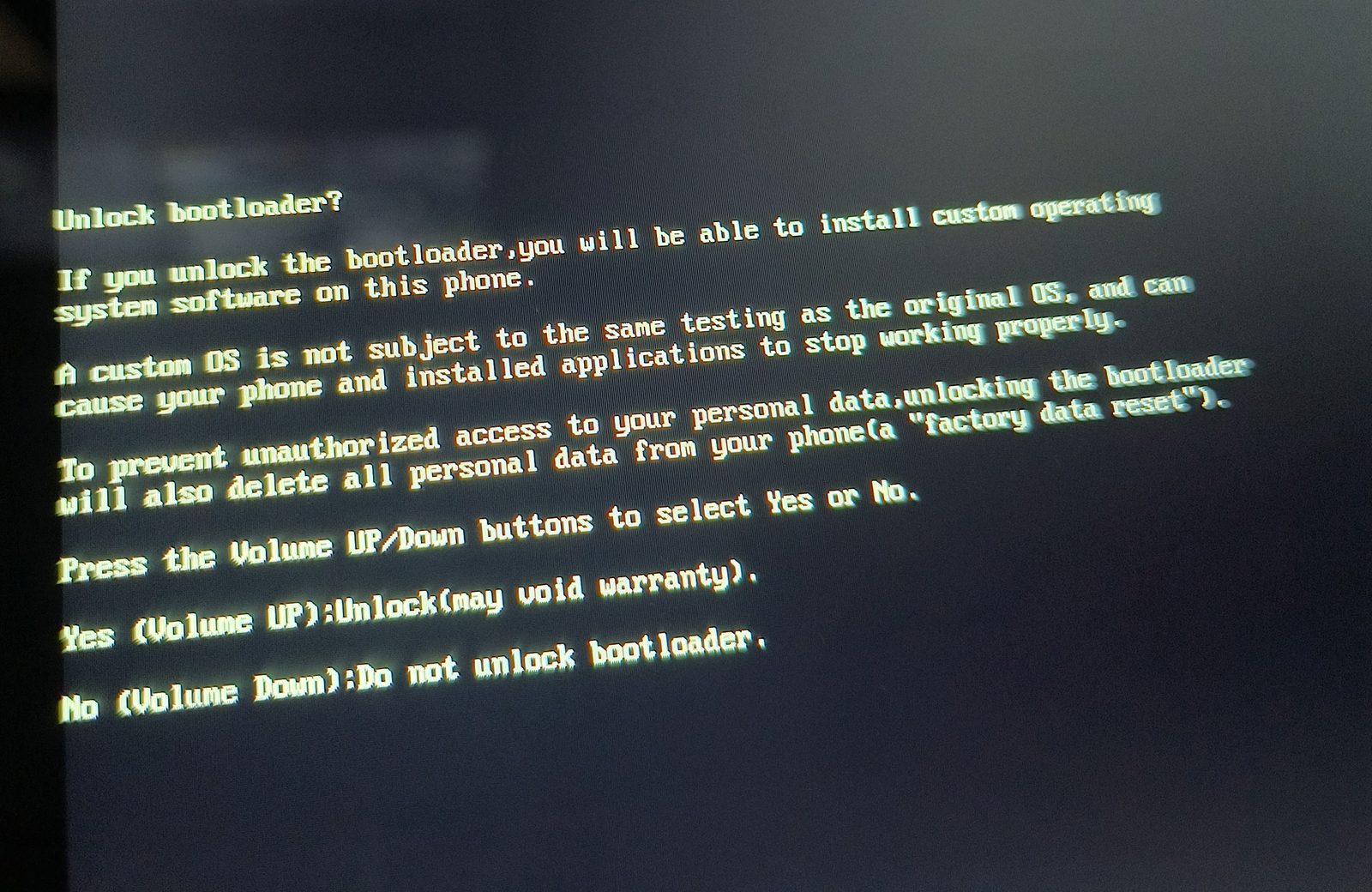
The warning screen deserves its own note. It is the one screen in the entire boot process that is legally supposed to be serious — the red text, the volume-key confirmation, the point past which the warranty story changes. And it calls this 8-inch tablet a “phone.” Twice. “Install custom operating system software on this phone.” “Delete all personal data from your phone.” Nobody at onn customised the screen, on the device whose bootloader everybody said onn had locked down on purpose.
The same evening retired a second myth. This tablet shipped on Android 14 and was running 15 when I bought it. “onn never ships major upgrades” was wrong too.
Distrust the backup
An unlocked bootloader only gets you out of a bad flash if you have something to flash back, and there is no official firmware for this model. What exists is a community SourceForge project hosting factory dumps pulled off these tablets with mtkclient. 100135923-TTA.33, 3.37 GB. It matched the publisher’s SHA-256 exactly.
That archive passed its integrity check. Here is what was inside it:
init_boot_a.bin   nonzero bytes: 0     ← entirely empty
vendor_boot_a.bin nonzero bytes: 0     ← entirely empty
boot_a.bin        magic: ANDROID!  21.7 MB
super.bin         magic@4096: gDla  6.78 GB
Two of the partitions in my restore point were zeros. Not corrupt — empty. Whoever captured the dump never captured them, and the archive checksummed perfectly anyway, because a CRC proves the bytes survived the download. It says nothing about whether anyone read anything off the device in the first place.
Flashing either of those images to recover from a bad flash would have written zeros across a working partition. The recovery step would have been the brick.
super.bin — the one the plan actually depended on — carried a valid logical-partition header and real data sampled all the way through. That is the check that made the rest of the evening safe to attempt. Verify magic numbers, then sample for non-zero data, before you trust anything as a way back.
Two related rules, cheap to state and expensive to learn: never restore nvram, nvdata, persist or proinfo out of somebody else’s dump — those carry per-device calibration and radio identifiers, and unlike the system images they are not generic. And MediaTek bootloaders do not implement fastboot boot, so there is no RAM-only dry run. A patched boot image cannot be tested without committing it to flash. Plan the recovery path before flashing, not after.
The flash, and the screen that looks like a brick
A GSI is not signed with the vendor’s keys, so verification comes off first. Then system turned out to be 1.07 GB against a 2.10 GB image, which is normal — deleting product freed the 2.73 GB needed, because a GSI brings its own.
$ fastboot --disable-verity --disable-verification flash vbmeta vbmeta.bin
$ fastboot reboot fastboot            # userspace fastboot
$ fastboot delete-logical-partition product_b
$ fastboot flash system gsi_system.img
Finished. Total time: 67.521s
$ fastboot -w && fastboot reboot
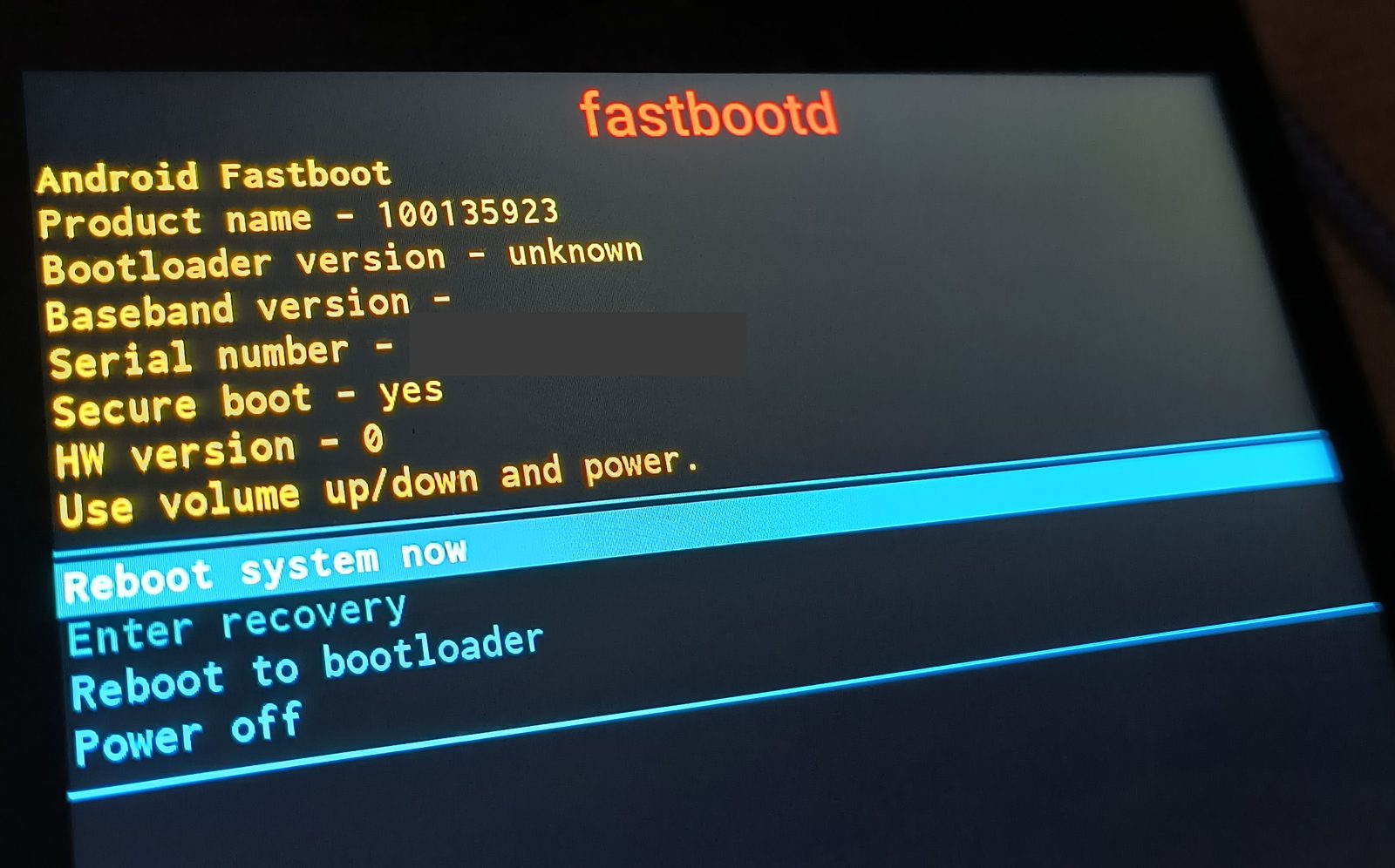
Sixty-seven seconds to write a different operating system onto a tablet whose own fastbootd screen was still cheerfully reporting Secure boot - yes in yellow.
Then the first boot landed on “Can’t load Android system. Your data may be corrupt.”
It looks exactly like failure and it is not. fastboot -w had already told me what it did — “Erase successful, but not automatically formatting” — leaving userdata wiped but with no filesystem on it. Choosing Factory data reset on that scary screen formats it properly. It booted straight through afterwards.
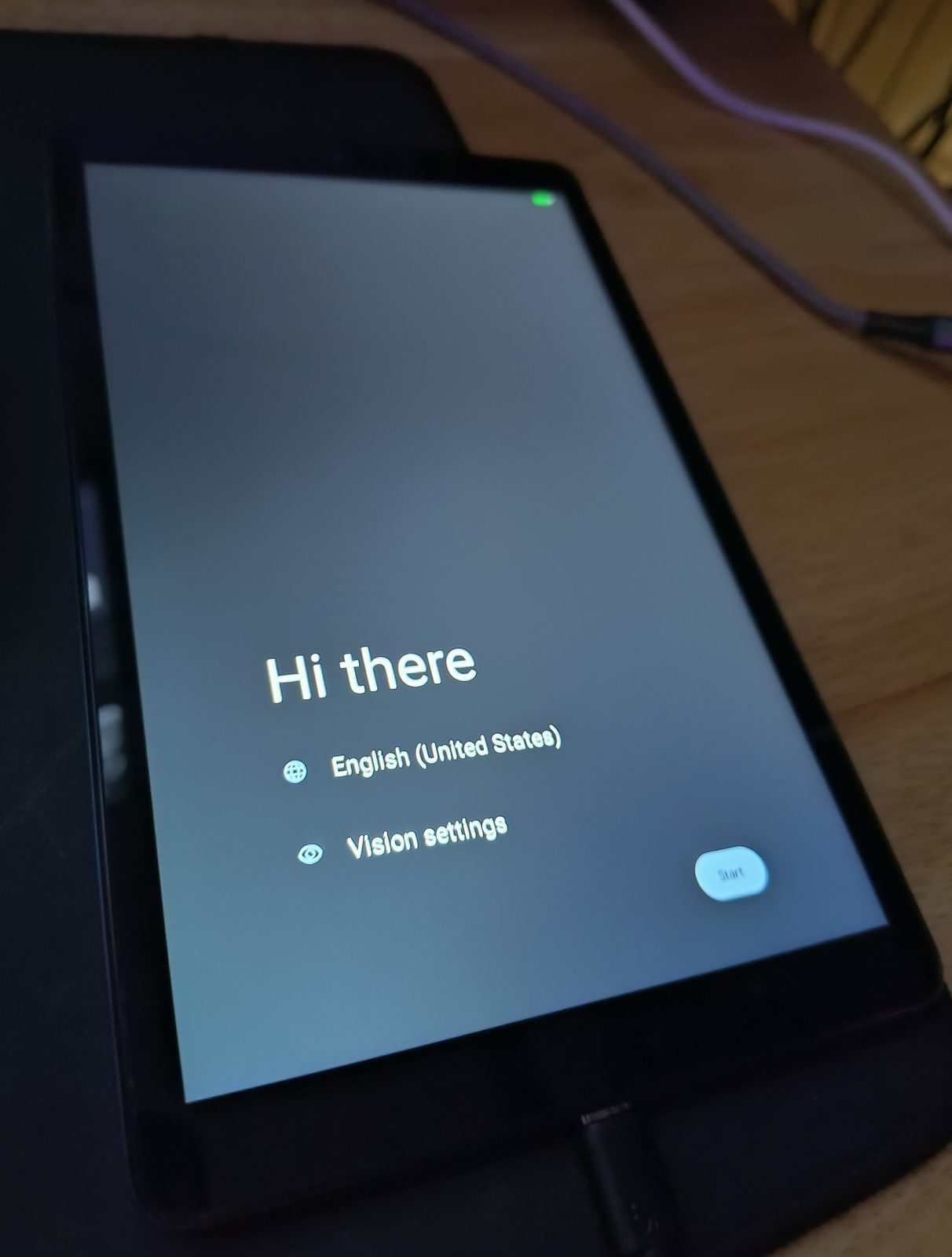
The photo timestamps tell the honest version of the story better than I can. Unlock warning at 20:15. Fastbootd at 21:00. The setup wizard at 21:10. Under an hour from the irreversible step to a running system.
What actually works
No GSI compatibility report existed for t302v. People are still asking on XDA whether this model unlocks at all. So this table is the give-back — everything in it measured on the running system after the flash, not inferred.
| Component | State | Evidence |
|---|---|---|
| Wi-Fi | works | associated, DHCP lease held |
| Bluetooth | works | enabled: true · state ON |
| Audio | works | controlC0 + 24 PCM nodes |
| Camera | enumerates | 2 devices — not yet shot-tested |
| Touch | works | jadard-touchscreen |
| Accelerometer | works | MTK, 5–200 Hz |
| Light sensor | works | auto-brightness available |
| Battery | works | level + health reported |
| Gyroscope | absent | not fitted — hardware, not the GSI |
| Magnetometer | absent | not fitted — hardware, not the GSI |
A clean sweep. Every fitted component works, and the two that don’t were never soldered on. For a device with no prior GSI coverage that is an unusually good result — camera and sensors are normally the first casualties.
Worth noticing what that table is. It’s the compatibility testing the manufacturer would have owed a customer, done in an evening by the customer, on a device the manufacturer had already written off.
The rice, briefly
Nova Launcher, the answer to this question for a decade, has shut down; Lawnchair is the answer now. Chakra Petch across all five font slots, a 4×5 grid with a four-slot dock, Delta icons, true black.
The one setting worth writing down is density. At 800 px wide, wm density 214 puts the device at 598 dp — just under Android’s 600 dp threshold, which drops it out of tablet mode into phone mode. In tablet mode the nav bar is drawn by Launcher3’s Taskbar rather than SystemUI, so a third-party launcher’s dock and the system’s buttons fight over the same strip of glass. Below 600 dp, SystemUI draws a normal three-button bar on its own row and the fight stops. Stock ran 152; LineageOS defaults to 180.
The debloat had one genuinely funny find: me.phh.qcrilam, a Qualcomm radio-interface adapter riding along in the GSI base, sitting disabled-in-spirit and enabled-in-fact on a MediaTek device.
Two things on this tablet earn more than a line.
The first is the wallpaper. It is 103 lines of GLSL — a perspective grid scrolling toward the viewer, a banded sun, stars twinkling on their own hash function, scanlines, a vignette — running at 58–59 fps on a Helio G80. Shader Editor has no import function, so it went in one adb shell invocation per line, 103 of them, from the host. (A device-side while read loop returns Failure calling service input: Failed transaction for every iteration and silently produces nothing. Ask me how I know: 370 times.)
It costs 36% of one core while the home screen is visible, with surfaceflinger taking another 29% alongside it. Screen off, or any app in the foreground, and both drop to 0.0%. On eight cores, 65% of one core is about 8% of the machine, and only while you’re looking at it.
103 lines. No framework, no engine, no dependency, nothing to update. That is what software has to look like to run on a Helio G80 with 2.9 GB of RAM, and it is also, not coincidentally, the size of thing that now takes an evening instead of a weekend.
The second is the panel above the sun, which is not an app icon that leads to telemetry. It is telemetry. Home Assistant’s companion app ships a Template widget that renders arbitrary Jinja on the home screen, so the tablet displays WAN throughput, HA host memory and disk, Nextcloud load, printer nozzle and bed temperatures, office climate, and a running count of how many of 326 sensors are currently dead.
A live lab dashboard, on a sixty-dollar tablet, rendering server-side truth instead of a shortcut to it.
The wallpaper, in full, as it went onto the tablet:
#ifdef GL_ES
precision highp float;
#endif

uniform vec2 resolution;
uniform float time;

const float HY = -0.06;   // horizon, in y-normalised centred coords

float hash(vec2 p) {
	return fract(sin(dot(p, vec2(127.1, 311.7))) * 43758.5453123);
}

void main() {
	vec2 frag = gl_FragCoord.xy;
	vec2 p = (frag - 0.5 * resolution) / resolution.y;
	float aspect = resolution.x / resolution.y;

	vec3 col;

	if (p.y > HY) {
		// ---------------- sky ----------------
		float t = (p.y - HY) / (0.5 - HY);
		vec3 ember   = vec3(1.00, 0.48, 0.29);
		vec3 magenta = vec3(0.87, 0.21, 0.48);
		vec3 violet  = vec3(0.49, 0.10, 0.45);
		vec3 indigo  = vec3(0.16, 0.05, 0.29);
		vec3 deep    = vec3(0.03, 0.01, 0.09);
		col = ember;
		col = mix(col, magenta, smoothstep(0.00, 0.10, t));
		col = mix(col, violet,  smoothstep(0.08, 0.30, t));
		col = mix(col, indigo,  smoothstep(0.26, 0.60, t));
		col = mix(col, deep,    smoothstep(0.55, 1.00, t));

		// ---------------- stars ----------------
		vec2 cell = floor(frag / 3.0);
		float h = hash(cell);
		if (h > 0.9972) {
			float tw = 0.45 + 0.55 * sin(time * 1.7 + h * 620.0);
			col += vec3(0.85, 0.90, 1.00) * tw * smoothstep(0.20, 0.95, t);
		}

		// ---------------- sun ----------------
		vec2 sunC = vec2(0.0, HY + 0.075);
		vec2 d = p - sunC;
		float r = length(d) / 0.155;

		// glow first, so the disc paints over it
		col += vec3(0.62, 0.10, 0.38) * 0.75 * exp(-r * 1.6);

		if (r < 1.02) {
			float g = clamp((sunC.y + 0.155 - p.y) / 0.31, 0.0, 1.0);
			vec3 sun = mix(vec3(1.00, 0.88, 0.36), vec3(1.00, 0.16, 0.50), pow(g, 0.85));

			// horizontal bands across the lower half, thickening downward
			float below = (sunC.y - p.y) / 0.155;
			float band = 1.0;
			if (below > 0.04) {
				float f = pow(below, 0.55) * 8.5;
				band = smoothstep(0.40, 0.52, fract(f));
			}
			float edge = smoothstep(1.0, 0.975, r);
			col = mix(col, sun, edge * band);
		}
	} else {
		// ---------------- ground ----------------
		float tg = (HY - p.y) / (HY + 0.5);
		col = mix(vec3(0.18, 0.03, 0.26), vec3(0.02, 0.01, 0.06), pow(tg, 0.55));

		float z = 0.35 / (HY - p.y);          // depth: small near viewer
		float gx = p.x * z * 12.0;
		float gz = z * 2.0 - time * 1.1;

		float wx = clamp(z * 0.019, 0.006, 0.42);
		float wz = clamp(z * z / 112.0, 0.005, 0.42);

		float lx = abs(fract(gx) - 0.5);
		float lz = abs(fract(gz) - 0.5);
		float lineX = smoothstep(wx, 0.0, lx);
		float lineZ = smoothstep(wz, 0.0, lz);
		float grid = max(lineX, lineZ);

		float fade = 1.0 - smoothstep(3.5, 9.0, z);
		vec3 gridCol = vec3(0.06, 0.93, 1.00);
		col += gridCol * grid * fade * 1.15;
		col += gridCol * grid * fade * 0.30;
	}

	// ---------------- horizon line + haze ----------------
	float dy = abs(p.y - HY);
	col += vec3(1.00, 0.42, 0.72) * exp(-dy * 900.0) * 1.10;
	col += vec3(1.00, 0.20, 0.55) * exp(-dy *  70.0) * 0.16;

	// ---------------- scanlines ----------------
	col *= 1.0 - 0.10 * step(1.5, mod(frag.y, 3.0));

	// ---------------- vignette ----------------
	vec2 v = (frag / resolution - 0.5);
	col *= 1.0 - dot(v, v) * 0.90;

	gl_FragColor = vec4(col, 1.0);
}
The optimisation that failed on a delay
Here is the part I want on record, because it is the only thing in this build log that fooled me completely.
The obvious optimisation for a fragment shader is dropping precision highp float to mediump. Mali-G52 runs mediump at roughly double rate. So it got changed.
It rendered pixel-identical. Measured 65.7% → 64.0% of one core, which is noise. Screenshot, benchmark, declare it fine, move on. Every signal available at the time said the change was safe and pointless, and “safe and pointless” is a conclusion you stop thinking about.
It is not fine. The scroll term is gz = z * 2.0 - time * 1.1, and time grows without bound. A mediump float carries about 11 bits of mantissa, so once time * 1.1 passes roughly 2048, representable values are a quarter apart and fract() can no longer resolve sub-unit positions. The grid lines go thick, snap between coarse steps, and flicker. gx = p.x * z * 12.0 degrades the same way once z gets large.
It looks perfect for the first few minutes. That is long enough to screenshot it, measure it, write it up and stop paying attention. The failure was reported later, by somebody actually looking at the tablet.
The measurement wasn’t wrong. The measurement was taken at time ≈ 30 on a bug that needs time ≈ 1860. Measure animated things after they have been running a while, not seconds after you apply them.
Reverting was a one-word edit.
Still open
Three loose ends, stated rather than tidied.
Five Quick Settings tiles never got added — Night Light, Reading mode, Location, System profiles, Extra dim. The removals landed; the additions didn’t. sysui_qs_tiles is a read-only mirror on Android 16, so writes to it are silently reverted and the tile set has to be edited in the UI.
Launcher3 is probably ~90 MB of reclaimable space, since density 214 puts this device in phone mode where SystemUI owns the nav bar. Untested, because getting it wrong removes the navigation bar entirely — which has already happened once — and undoing it needs a working adb session.
And Android 16 has real desktop windowing, gated at 600 dp. The density fix that stopped the taskbar colliding with the nav bar deliberately parks this device at 598. Saved window layouts and the nav bar you actually want are, for now, in direct conflict, and I have not resolved it.
What support was actually for
The seed, grown.
Nobody ever threw away a tablet because the processor wore out. They threw it away because the software stopped arriving. Support was the product — the device was the delivery mechanism — and the end-of-support date was a company’s decision that writing any more code for this thing was not worth what it would cost them. At sixty dollars a unit, that decision is easy and it comes early.
Both sides of that trade are moving right now, and they’re moving in opposite directions.
Hardware is getting more expensive. Memory prices, tariffs, the entire supply chain bid up by people building data centres. A capable 8-inch tablet on a shelf at twenty-seven dollars is going to read, in a few years, as an artifact of a specific and closing window. The reflex answer to an abandoned device — use it till it dies, then buy another one — assumed the replacement would be cheap and better. That assumption is the one I’d stop making.
Software went the other way. The last five percent that makes a device actually good — the density value that stops the taskbar fighting the nav bar, the tile set, the shader, the widget that turns a kitchen tablet into a lab dashboard — was never hard, exactly. It was just uneconomic. Nobody was going to bill for it and nobody was going to ship it in a firmware update, so it didn’t exist. It costs an evening now. The economics that made abandonment rational for onn don’t hold for one person with a model that will write 103 lines of GLSL and then explain what mediump does to a scroll term at time ≈ 1860.
So vendor support matters less every year, and it isn’t because vendors got worse. It’s because the moat around “someone has to write the software” is draining, and what’s left standing is the hardware itself — which is the expensive part now, and the part worth keeping.
That cuts both ways, and this build log is the evidence. The leverage is real and it lies to you. The mediump change was written fast, measured honestly, and wrong in a way that only surfaced half an hour later. Cheap software is not correct software; it’s software you can afford to write, verify slowly, and revert in one word. The scarce thing stopped being the writing and became the checking.
Old hardware is not waste. It’s substrate that already exists, already shipped, already paid its carbon, sitting behind a support date somebody else picked. Lean software is what makes it run, and lean software is exactly what got cheap.
Sixty dollars twenty-seven dollars, one evening, and a toggle that was never greyed out.