the thermostat gets the last word
The bedroom was 60.8 °F at 00:53. It was 9 °F outside. The thermostat said everything was fine, and from where it hangs, it was.
The house has two Gen 2 Nest Learning Thermostats. Google stopped supporting them on October 25, 2025. They still heat the house, but the app can’t reach them. Ours run No Longer Evil, community firmware you flash over USB. It points the thermostat at a server you choose instead of Google’s. Ours points at a Home Assistant add-on, which bridges the two Nests in over MQTT. So the hardware Google walked away from is now one more device in Home Assistant, as scriptable as a light switch.
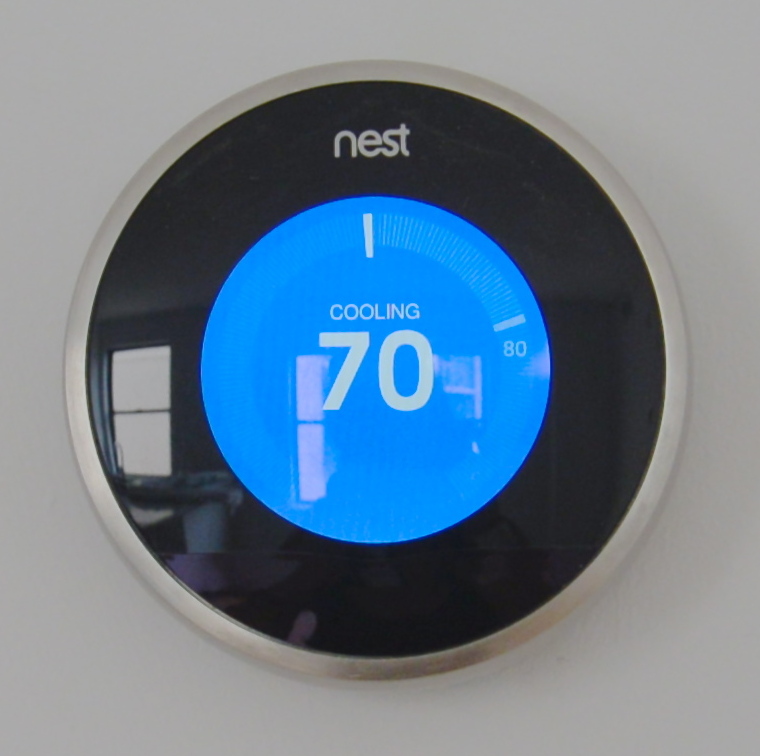
That one isn’t ours. It’s a photo by Amanitamano, taken in 2013 and shared under CC BY-SA 3.0. Ours look exactly like it. Flashing changes the software and leaves the face alone, so a Nest on No Longer Evil looks like every other Nest on every other wall. It just answers to us now.

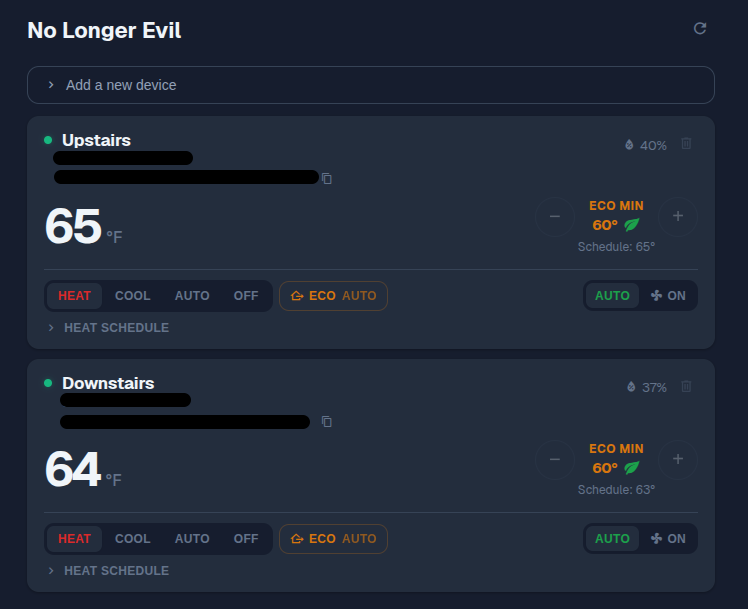
This is what they answer to: the No Longer Evil add-on’s page inside Home Assistant, with both thermostats on it. Upstairs is set to 65, Downstairs to 64, both in heat mode. It has roughly the controls the Nest app used to have, served from a machine in the house instead of from Google.
Almost as scriptable, and this post is about the gap.
the wrong room
The house has two furnace zones. The Nest called Upstairs hangs in the master bedroom. The same zone also heats a second bedroom down the hall, the bedroom this post is about. There’s a Zigbee temperature sensor in it, and on cold nights that sensor reads 1 to 3 °F colder than the Nest does. The Nest holds the master bedroom at its setting while the other room slides down overnight.
So the goals were simple:
- keep the bedroom at 62 °F or warmer all night
- don’t cook it by morning (64.9 was “way too warm”)
- short furnace burns over long runs to a raised setting
- never fight a person who changes the thermostat by hand
The control path looks like it should make this easy:
Zigbee sensor → Home Assistant → automation → MQTT → No Longer Evil → Nest → furnace
Read it again and look at the last arrow. Home Assistant can change the Nest’s setting. That’s all it can do. The Nest then compares that setting with its own sensor, in the warmer room, and decides for itself whether to call for heat. Everything upstream of that arrow is advice.
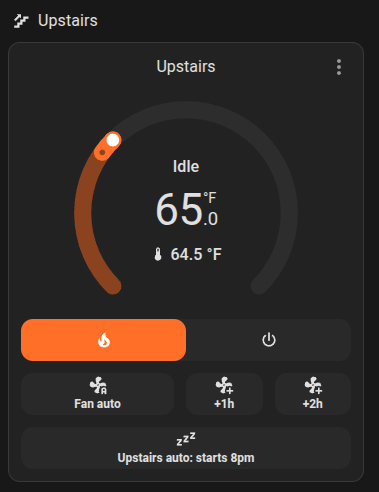
That’s the Upstairs card on the Home Assistant dashboard. The setting is 65. The Nest reads 64.5. It’s idle. Half a degree under isn’t enough for it to call for heat, and nothing on the card can change its mind. The line at the bottom is our automation, waiting for 8 pm.
The thermostat gets the last word. It took us a week to take that seriously.
a week of getting it wrong
Every night was colder than the one before. On the first night the low at the nearest weather station was 23 °F. By the last it was 9 °F. A setting that held the room on the first night doesn’t hold it on the last, so the week was a moving target.
| Night | Approach | Bedroom low | Bedroom high | Outside low |
|---|---|---|---|---|
| 11/18 | Nest schedule, flat 64 | 60.6 | 62.3 | 23 °F |
| 11/19 | Schedule, hand tweaks | 61.2 | 63.5 | 23 °F |
| 11/20 | v1: +1 °F boost | 62.9 | 65.2 | 25 °F |
| 11/21 | v2: boost with memory | 62.2 | 64.9 | 19 °F |
| 11/22 | v3: pulses to a fixed 64 | 61.8 | 63.6 | 16 °F |
| 11/23 | v3 + fixes, then 65 by hand | 60.8 | 63.8 | 9 °F |
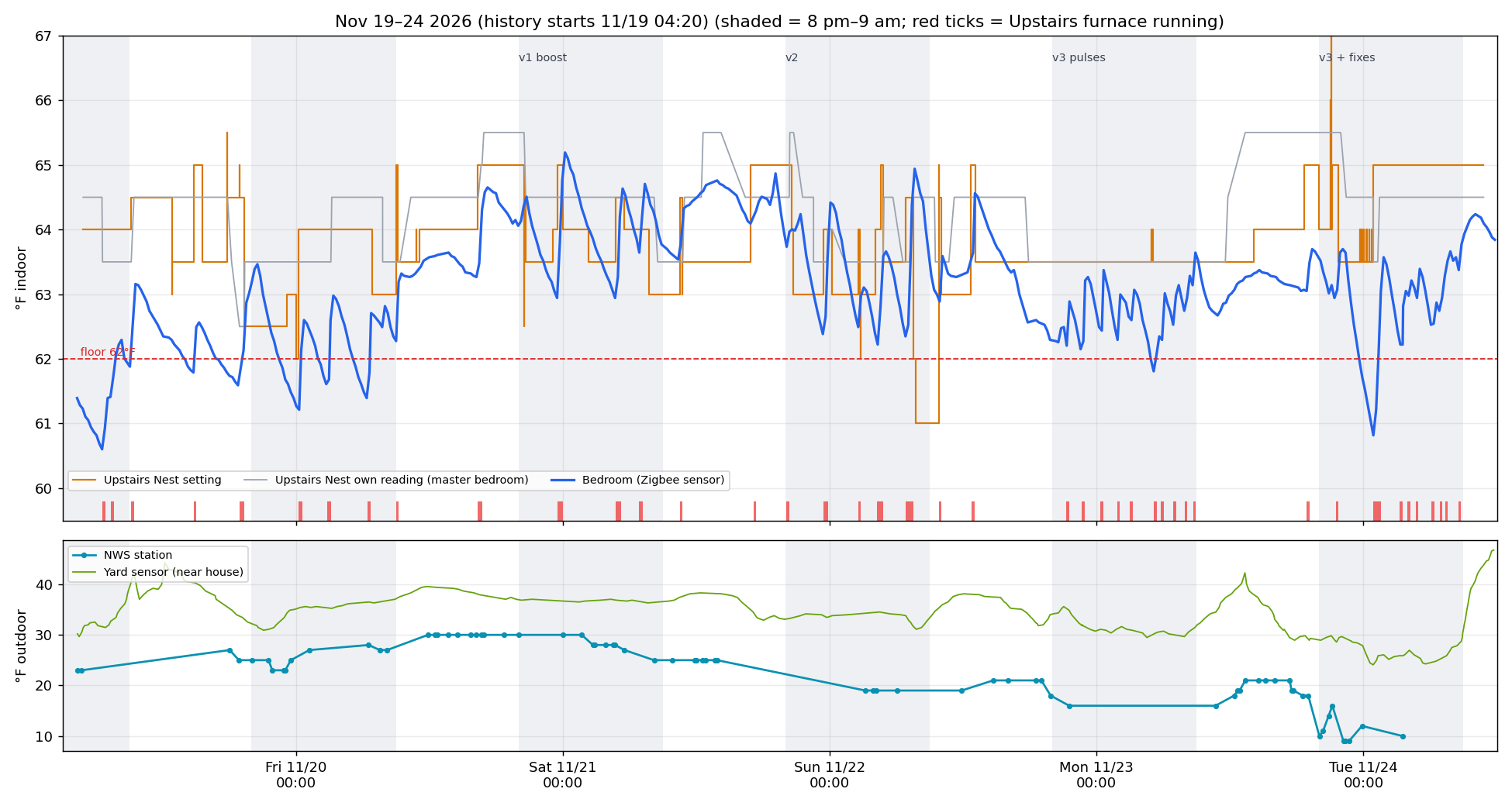
The whole week in one picture. Orange is the setting, grey is what the Nest reads in the master bedroom, and blue is the bedroom we actually care about. The grey line spends nearly the whole week above the blue one. The bottom panel is outside, getting colder.
The schedule. We started with the Nests’ own weekly schedules. They went first. A single 00:00 entry re-applied itself every midnight and quietly wiped out any change made by hand that evening. With no schedule, a Nest just holds its last setting, which turns out to be what you want once something else is doing the thinking. We saved the old schedules as JSON and deleted them.
v1: boost. If the bedroom drops below 63, raise Upstairs by a degree. If it goes over 64.5, set 64. It overshot to 65.2. The trigger sat inside the room’s normal swing, so boosts fired at the bottom of ordinary furnace cycles, on top of heat that was already coming. The “reset to 64” also stomped a 63.5 someone had picked by hand.
v2: boost with memory. A helper remembered the setting from before the boost and put it back afterwards. The trigger moved down to 62.5. Then the repeat loop stacked a second degree on the first. The 06:50 boost ran the furnace for 39 minutes, and the bedroom hit 64.9 at 07:38. Warm enough to wake up annoyed.
v3: short pulses. This is where it got careful. Bedroom below 62 for two minutes → set Upstairs to 64 → run eight minutes from the moment the Nest reports heating → restore → wait fifteen minutes, because the bedroom lags the furnace by about that much → repeat at most twice. Around it went a ring of safety parts:
- a restore that waits for the Nest to confirm and retries once
- a watchdog every five minutes, in case Home Assistant restarts or an MQTT command gets lost mid-pulse
- a guard that refuses to act on a sensor that hasn’t reported in 45 minutes
- override detection, so a person’s change wins
- a night ceiling, a 09:00 restore, and a rule that keeps Downstairs a degree below Upstairs at night
- a status row and a “resume auto” button on the dashboard
It was the best-engineered version of the week. It never started the furnace. Not once. Eight attempts over two nights, eight log lines reading “furnace did not start.”
The Nest in the master bedroom already read 63.5 to 64.5. Setting it to 64 asked it to heat a room it thought was already at 64. It said no, correctly, eight times. On the 9 °F night the bedroom slid from 63.7 at ten o’clock to 60.8 at 00:53. It was below 62 for about an hour and three quarters before the cold alert went off and someone got up and set 65 by hand.
The furnace ran 43 minutes. By 01:48 the bedroom was back to 63.6, and it held between 62.2 and 63.8 until morning, cycling normally. A steady setting the Nest could act on did what a week of clever automation hadn’t.
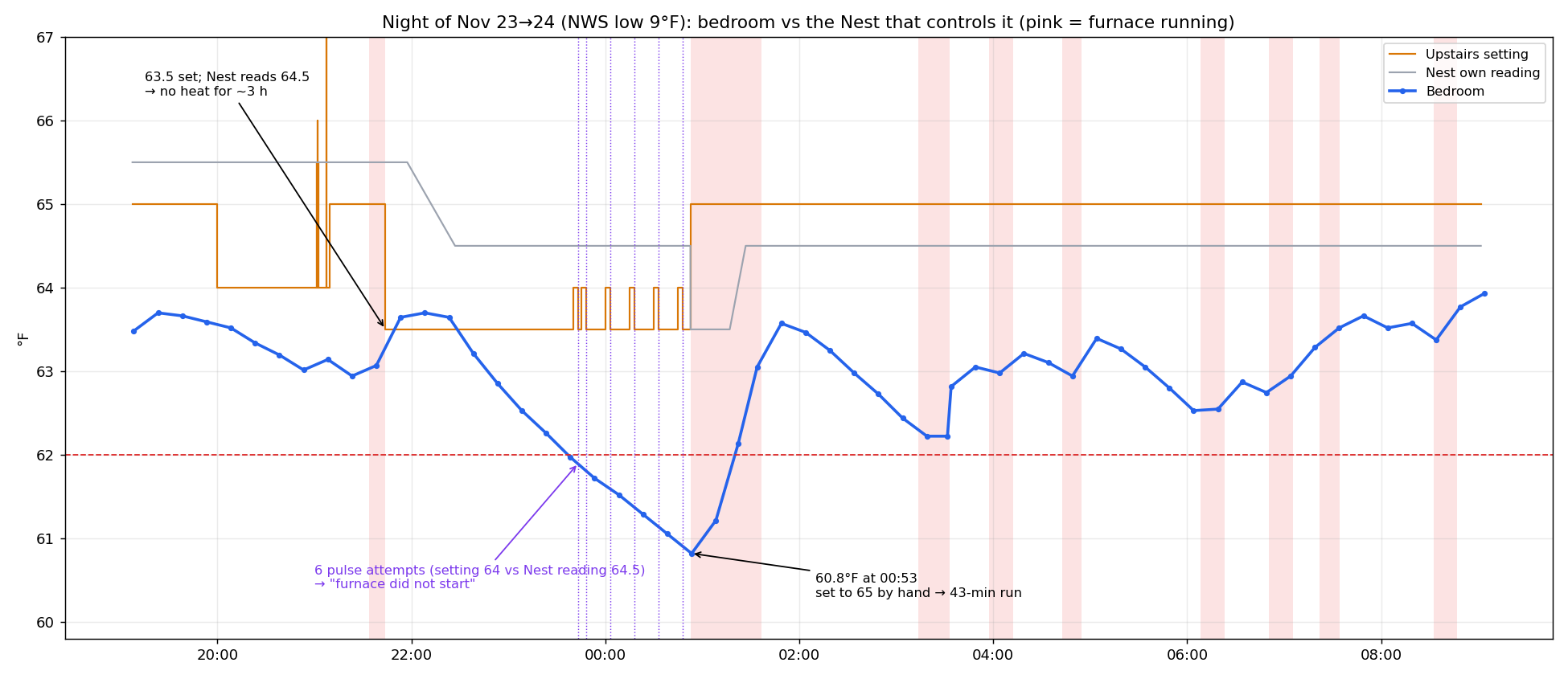
The 9 °F night. The six thin purple lines are v3’s pulses, each one asking for 64 from a thermostat reading 64.5. The pink band at 00:53 is the furnace finally running, because a person asked for 65.
the log was right the whole time
Two things from v3 are worth more than the rest.
First, “furnace did not start” was in the logbook from the first failed pulse:
Mon 11/23 23:43  Pulse 1: furnace did not start (Nest at 64.5F vs cap 64F); setpoint restored, giving up this run
Mon 11/23 23:48  Pulse 1: furnace did not start (Nest at 64.5F vs cap 64F); setpoint restored, giving up this run
The log even said why, in its own words: the Nest read 64.5 and we were asking for 64. The dashboard looked healthy. The watchdog was happy. Every safety part did its job perfectly around an action that did nothing. A system can be completely safe and completely useless at once, and only the log will tell you which. The rule now is to read it after every night.
Second, Home Assistant’s override detection has a trap in it. The natural test for “a person changed this” is a change with no parent context. But an automation fired by a time trigger also has no parent context. So our own 05:00 pulse showed up in the log as a human setting the thermostat:
Mon 11/23 05:00 Upstairs set by hand to 64.0F: warmth boost off until 09:00
Nobody was up. The automation saw its own write, decided a person had made it, and stood down for the rest of the night. The fix was to make every automation write a timestamp to a text helper right before it touches the Nest. The override check skips any change whose context matches that write. An automation has to sign its own work, or it can’t tell itself apart from you.
The log also caught us breaking the fourth goal. At 21:01 someone set Upstairs to 64.5, and the night ceiling, then 64, set it back. Eleven times in six minutes. Never fighting a person was a rule on paper and a fight in the logbook. The ceiling went up to 65 that night, and in v4 to 68.
measure the furnace before you tune it
After v3 we stopped guessing and read the history. Twenty Upstairs furnace cycles over two nights gave a usable model of the room:
- the bedroom rises about 0.065 °F per furnace-minute, after about five minutes of warm-up
- the peak arrives 10 to 15 minutes after the burner stops
- with the furnace idle, the bedroom loses about 1 °F an hour
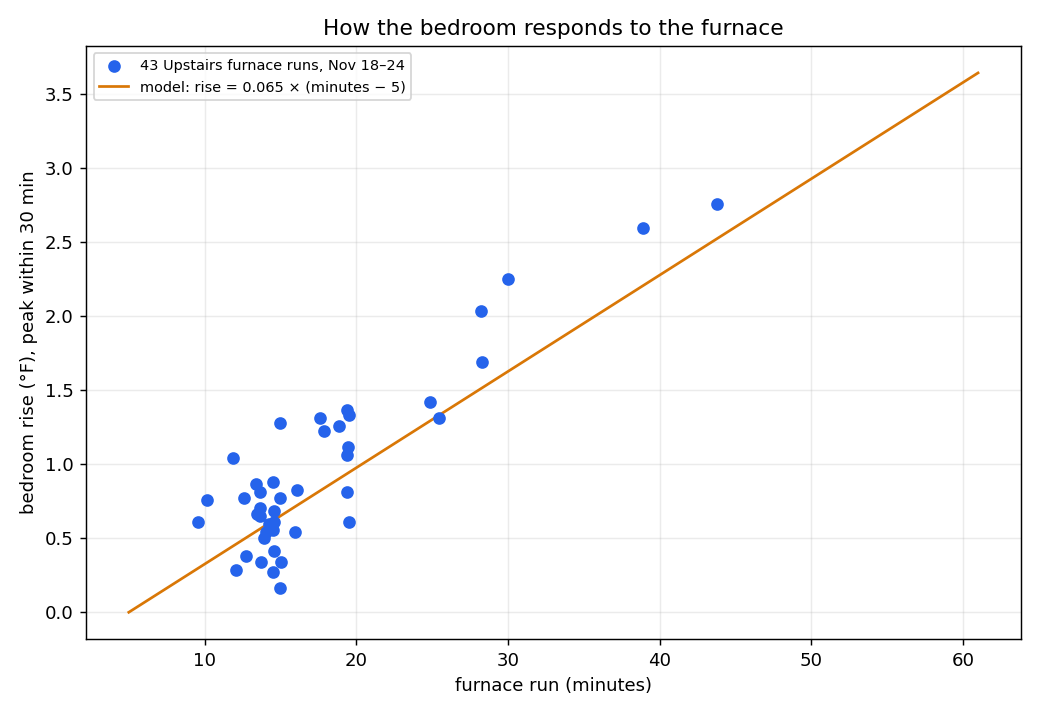
That’s three numbers. Here they are against all 43 Upstairs runs from the week. Short runs scatter, because the house has opinions of its own, but the long ones land close to the line. Every version before this had been tuned with values someone guessed. v4 is built from these three.
v4: lie to it by a known amount
You can’t move the Nest’s sensor, and you can’t overrule it. What you can do is hand it a setting it will act on. The fix for v3 is one word: relative.
When the bedroom drops below 62 for two minutes, any time between 20:00 and 09:00, v4 sets Upstairs to the Nest’s own current reading plus 2 °F, rounded up to the half degree and never above 68. The Nest always sees a room two degrees colder than it wants, so it always starts the furnace. In the automation it’s one Jinja template:
{% set c = state_attr('climate.upstairs_nest','current_temperature') | float(64) %}
{% set b = states('input_number.bedroom_pre_boost_setpoint') | float(63) %}
{{ [[ ((c + 2) * 2) | round(0, 'ceil') / 2, b + 0.5 ] | max, 68 ] | min }}
c is what the Nest reads, not what we wish it read. That one variable is the whole difference between v3 and v4.
The burn length comes from the measured rise:
burn = 5 + (63 − bedroom) / 0.065 minutes, clamped to 10–60
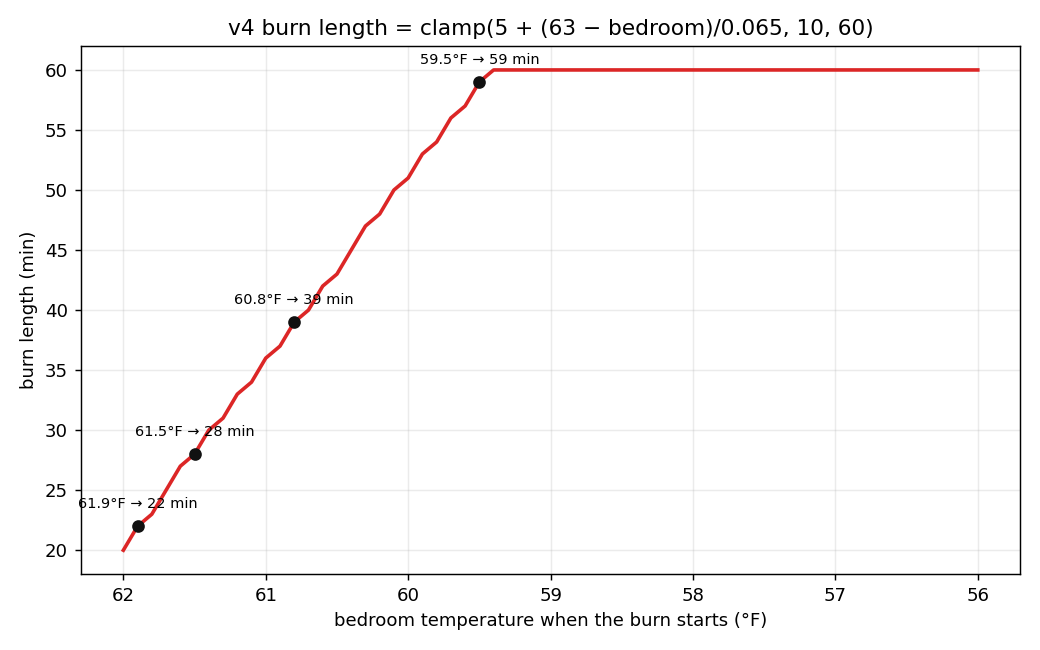
If the furnace hasn’t started within five minutes, it gives up and restores. If anyone changes the setting during a burn, the burn ends and their number stays. After the burn it settles twenty minutes and goes again if the room is still under 62.5, at most twice.
Then there’s the ratchet. Each burn that finishes leaves the night setting half a degree higher, because needing a rescue means the setting was too low for tonight’s weather. If the bedroom climbs past 64, it steps back down half a degree every fifteen minutes, but only undoing raises it made itself. At 09:00 whatever is left comes off. A change by hand becomes the new baseline and clears the count. The night ceiling went from 65 to 68. On a 9 °F night the house has to be allowed to run warmer, and 68 is the hard stop.
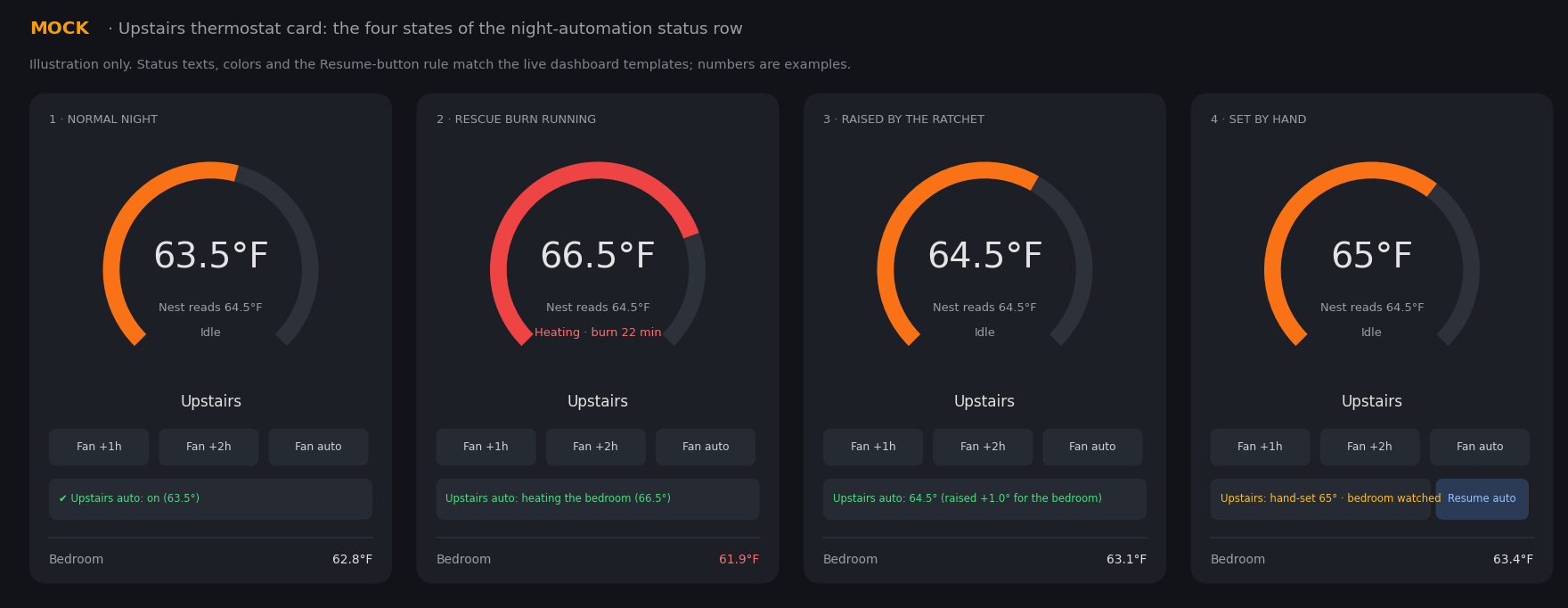
The dashboard says which of those it’s doing. This is a mock, with example numbers. The status texts and colours are the live templates, and the last state is the only one with a button: Resume auto, for after someone has set it by hand.
We replayed the 9 °F night through v4 to see what it would have done. It’s a simulation: real bedroom readings up to the first burn, and the measured model after that. The bedroom crosses 62 at 23:38. At 23:40 v4 sets Upstairs to 66.5 against a Nest reading 64.5, and the furnace runs 21 minutes. The night setting ratchets to 64. The room dips under 62 once more after one o’clock, gets another 21 minutes, and the setting ratchets to 64.5. The Nest cycles on its own after that, and at 09:00 the extra degree comes off. The bottom of the night is about 61.9 instead of 60.8. Nobody gets up.
The setting now follows the bedroom, using a sensor in the wrong room as the actuator. That’s the honest description of what Home Assistant does here. It doesn’t control the furnace. It controls what the Nest believes it should be aiming for, and the Nest controls the furnace.
the last word
Google let go of these thermostats a year ago. The firmware is community code, the server is a Home Assistant add-on, and the room temperature comes from a Zigbee sensor in the bedroom. Every layer above the device has changed hands. The decision at the bottom hasn’t. A sensor in a thermostat designed in 2012 still decides whether the furnace runs, and the only thing anyone upstream can do is ask in terms it will accept.
That’s the pattern any time you put automation on top of a device with its own control loop: a thermostat, a car’s cruise control, a cloud autoscaler. You don’t replace the loop. You feed it a reference it will act on, and you measure how it responds before you decide how far to push.
If you’re running something similar, here’s the Home Assistant config as JSON: the rescue burn, the reset and ratchet, the override detection, the watchdog and the resume script.
Tonight is v4’s first real night. The forecast says it’ll be cold.